


 Deutsch
Patch Notes

New Content
Idle Unit Indicator
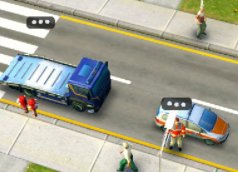
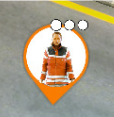
A new visual feature has been added to missions to highlight units that are currently idle and could be performing a task.A small visual indicator consisting of three hopping dots will appear over an idle unit or vehicle if all of the following conditions are met:
The unit or vehicle...
- ...is not currently performing a task but has a task available.
- ...has been idle for a certain amount of time after arriving at the scene, after a task became available, or after respawning.
- ...is not currently respawning.
- ...is not exclusively a transport vehicle whose only purpose is bringing a unit to the scene (for example, the doctor’s car, a fire truck, or similar).
The idle indicator is visible:
- Directly above the unit or vehicle.
- Attached to the unit/vehicle bubble that indicates the direction of off-screen units.
- In the bottom-left corner of the mission screen where you can also see how many idle units or workers you currently have.

New Equipment Items
New equipment items have been added to the game.Keep your eyes peeled during upcoming events to discover which new items have been introduced!
New Soccer Missions
Seven brand-new Soccer missions have been added to the game. They will become available during the upcoming Fire Cup Board Game event.
Night Mode
Missions can now officially be played in Night Mode!We are starting with four of the new Soccer missions and will gradually expand the number of missions available in Night Mode in the future.
Play through the Soccer missions as often as possible to experience both the daytime and nighttime versions of the same mission.
Operation Map Improvements
Wondering when you will unlock new map areas and units?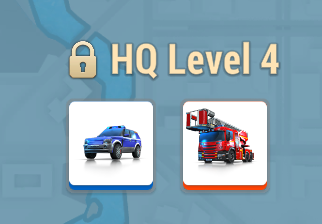
The Operation Map now clearly shows:
- Which map areas unlock at each HQ-level.
- Which units become available once those areas are unlocked.
Mission Briefing Improvements
Missing a unit?The Mission Briefing will now tell you how to obtain it.
If a unit in the Mission Briefing has a small warning icon, it means the unit is unavailable for this mission.

Reasons why the unit might be unavailable:
- No road leads to the depot in your base
- You don’t own the unit yet
- You own the unit, but have not built the depot yet
- The unit is already on a support mission
Once the unit is available to you, you will be able to play the mission.
Skip-Its
Skip-Its are now available for purchase in the in-game store in three different bundle sizes.
Additionally, the visual representation of Skip-Its has been updated in all places where they can be used.
What a Riot!
Preparations for an upcoming brand-new unit!
Rescue Pass
New Rescue Passes have been added to the game.Keep an eye out for the next one at the beginning of July!
Reward tiles in the Rescue Pass lanes have been visually improved to better represent the rarity of rewards.
Equipment items can now be identified by small indicators on the background tile:
- Common – No indicator
- Uncommon – Green
- Rare – Blue
- Epic – Purple
- Legendary – Gold
Survey Info Screen
The Survey Info screen has been replaced with a more visually appealing asset.With a little luck, you might get to see it soon!

Bug Fixes
- Soccer Mission "Accident at Watch Party!" - Fixed an issue where the mission could not be completed because patients could not be treated and the search dog could sometimes get stuck.
- Ring Menu - Fixed an issue where the "?" button was still visible in the Ring Menu, even though it had previously been moved to the Settings menu.
- Mission "Road Accident Causes Fire!" - Fixed an issue where the ladder truck objective was missing and one available ambulance parked outside the mission area could not be selected.
- Police Voices - Fixed an issue where voice lines did not match the correct gender. Male police officers now use male voices and female officers now use female voices.
- Billboards - Fixed an issue where incorrect events were sometimes advertised on in-game billboards.
- Mission "Lightning Strike Ignites Tree Fire" - Fixed an issue where units could sometimes move outside the mission area.
- Mission "Terror Attack at the University!" - Fixed an issue where the S.W.A.T. vehicle could not be sent away after loading perpetrators.
- Commanders Showdown - Fixed an issue where the task "Complete 3 1v1 Missions" awarded more points than the task "Win 3 1v1 Missions". The task to Win 3 1v1 Missions now awards more points than simply completing three matches, as winning three matches is more difficult.
- Board Game - Fixed an issue where boardgame-related missions would sometimes not spawn in all event map areas due to incorrect dependencies.
- Airport Crash Tender – Fixed an issue where an error could occur when trying to train the Airport Crash Tender without having its depot built yet. It is no longer possible to start training without the required depot.
- Airport Crash Tender – Fixed an issue where the level displayed in the training centre could be wrong. It will now show the correct level.
Web Only
- User Interface - Fixed an issue where the base user interface could break after the game had been closed in the background, and a garage button was clicked.
- Share

